
Worktrees
A Git worktree gives one repository multiple checkouts. Each checkout can use a different branch.
PiS can list, create, open, and remove worktrees.
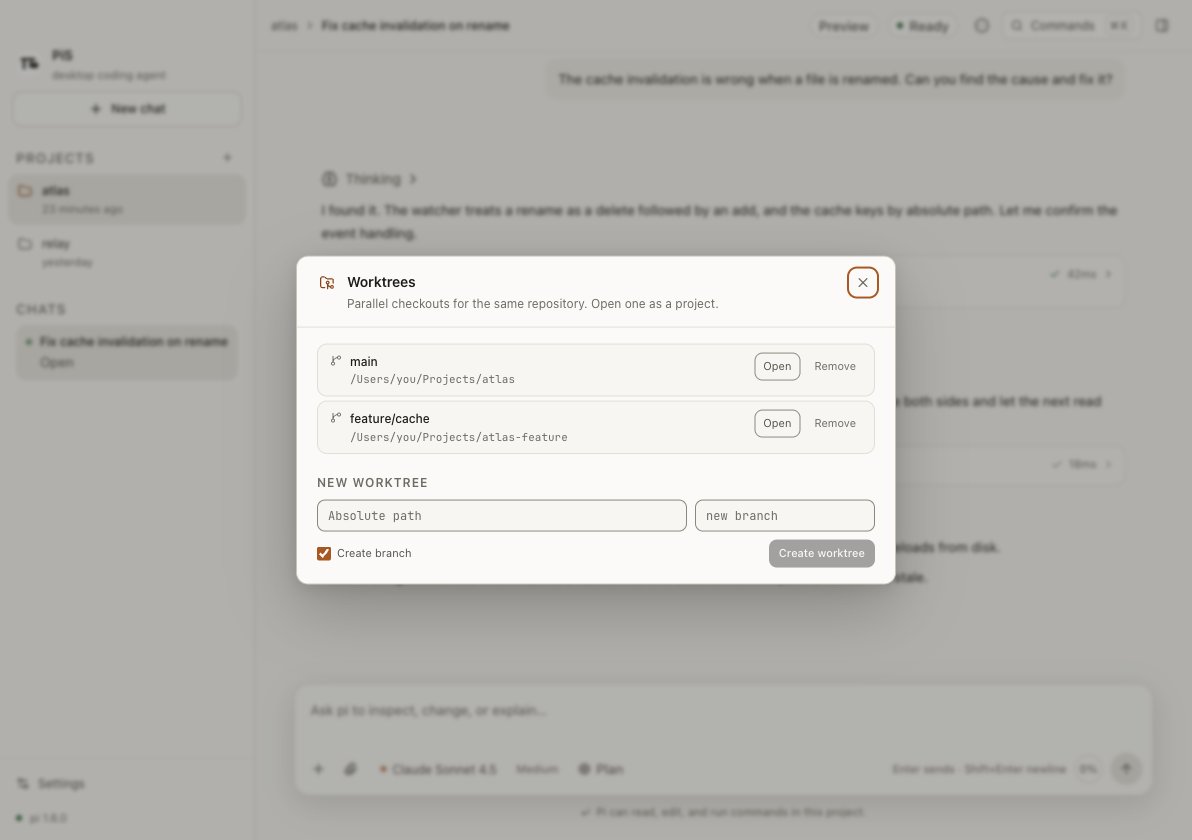
Open the worktree dialog
- Press
⌘Kto open the command palette. - Select Manage worktrees….
The dialog needs a current project. Without a project, it asks you to open one.
View worktrees
The list shows all worktrees of the repository.
Each entry shows:
- The branch name.
- The detached HEAD state.
- The lock state.
- The directory path.
The main worktree and linked worktrees appear in the list. You cannot remove the main worktree.
Create a worktree
Fill in the New worktree area:
When Create branch is on:
- The branch name is required.
- pi creates a branch from
HEAD. - The new worktree checks out that branch.
When Create branch is off:
- The branch name is optional.
- If you enter a branch name, PiS checks it out.
- If you leave it empty, Git uses the default behavior.
After you click Create worktree, PiS runs git worktree add.
On success:
- The list refreshes.
- The new directory appears in the list.
- You can click Open to open the directory as a project.
On failure, PiS shows the Git error. Common causes:
- The directory exists.
- The branch exists.
- The path is not writable.
- The branch is checked out in another worktree.
Open a worktree
Click Open on a worktree entry.
PiS opens the directory as a project. You can then:
- Create a session in the project.
- View changes in the directory.
- Use the branch of the directory.
A worktree directory is a normal project. Project trust rules apply.
Remove a worktree
Click Remove.
After you confirm, PiS tries a normal removal.
If Git finds uncommitted files, it refuses the removal. PiS then shows a second confirmation dialog.
The second dialog explains:
- Forced removal deletes uncommitted files.
- The branch and committed work stay in the repository.
After you confirm, Git deletes the directory.
You cannot remove:
- The main worktree.
- A locked worktree. Unlock it in Git first.
- A directory used by another process.
Removing a worktree does not delete the branch. Use Git commands or pi Git tools to delete a branch.
Worktrees and sessions
A worktree is a separate directory. A session in a worktree uses that directory as its working directory.
pi manages session files. PiS lists sessions by project directory.
When you switch between worktrees, check the current project. The top bar and sidebar show the project name.
Next
- Projects: open and manage projects.
- Sessions: create sessions in a project.
- Changes and files: view changes in a worktree.